
~/.local/bin/radius for external terminals and adds that directory to your
shell PATH when needed.
The shell says radius: command not found
Open a new terminal window after Radius starts. If the command is still missing,
run:
$HOME/.local/bin. Then choose
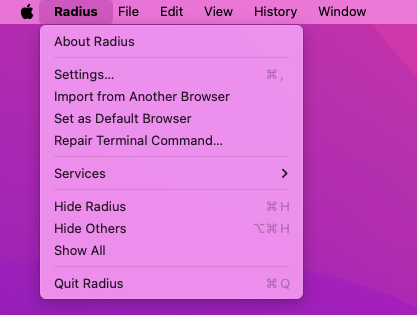
Radius → Repair Terminal Command… and open another terminal window.
Repair the terminal command
Choose Radius → Repair Terminal Command… to check the launcher, shellPATH, bundled CLI version, and login-shell configuration. Radius repairs a
missing, stale, or broken Radius-owned launcher without replacing another
command at the same path.
PATH setup for zsh, bash, sh, and fish. For another
shell, add this directory to your PATH:
A different radius command runs
Run:
$HOME/.local/bin/radius. If another command appears
first, adjust your PATH only if you want the app-bundled CLI to take
precedence.